Verifying an approved subdivision in Ivory Coast: the step-by-step MCLU tutorial (2026)

The official platform construction.gouv.ci/mclulotissement makes it possible to verify whether a subdivision is approved, cancelled, or suspended. It is free of charge and takes 5 minutes. Visual guide with the 7 form fields, the 3 statuses, and the pitfalls to avoid.
Need a land expert?
Speak with an advisor for free. Reply within 24 business hours.
Key citations
Standalone, verifiable phrases, quotable as they stand.
- "The official platform for verifying subdivisions in Ivory Coast is freely accessible at construction.gouv.ci/mclulotissement/index.php. It exposes seven search fields and three official statuses: Approved, Cancelled, Suspended." Capital Foncier, direct verification, April 2026.
- "A 'suspended' subdivision means that its approval procedure is on hold. No transaction on the lots should be carried out without further verification with the Direction du Domaine Urbain (DDU, the Urban Domain Directorate)." MCLU interpretive doctrine, BÂTIR No. 004, 2022.
- "Between 2020 and 2023, the DUDU of the MCLU received 996 requests for subdivision regularization, an average of 249 per year. The pool of subdivisions undergoing compliance is therefore substantial." MCLU Statistical Yearbook 2018-2023, Table 11.
In brief
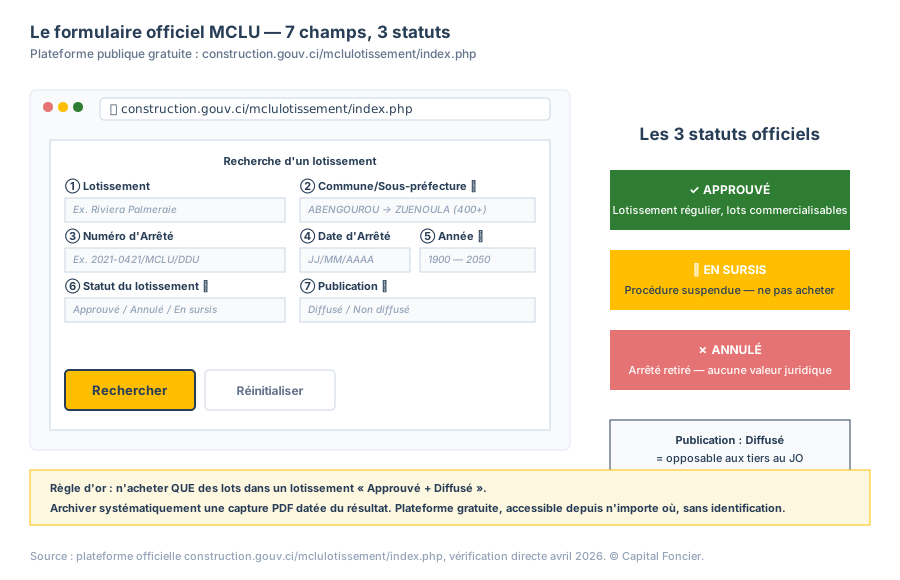
Before signing any sale agreement on a lot in Ivory Coast (Côte d'Ivoire), you can check the status of the subdivision yourself, at no cost, on the official platform of the Ministry of Construction (MCLU): construction.gouv.ci/mclulotissement/index.php. The form exposes seven search fields (Subdivision, Commune/Sub-prefecture, Order Number, Order Date, Year, Subdivision Status, Publication) and displays three official statuses: Approved, Cancelled, Suspended. A lot in a subdivision marked "suspended" or "cancelled" should never be purchased without further verification. This tutorial explains step by step how to query the platform, how to read a result, and how to archive proof of consultation.
Key figures for verification in 2026
| Indicator | Value | Source |
|---|---|---|
| URL of the official platform | construction.gouv.ci/mclulotissement | MCLU / DDU |
| Number of form fields | 7 | Official platform |
| Official statuses | 3 (Approved / Cancelled / Suspended) | MCLU |
| Publication states | 2 (Released / Not released) | MCLU |
| Number of communes/sub-prefectures listed | 400+ | Official dropdown |
| Year range covered | 1900-2050 | Platform |
| Cost of consultation | No charge | MCLU |
| Subdivision requests processed 2020-2023 | 2,440 | MCLU Yearbook, Table 11 |
A Capital Foncier advisor checks the status of the subdivision you are interested in on the official platform and calls you back within two hours. Get my diagnostic.
Why verify a subdivision before buying a lot
An individual lot has legal value only if the subdivision it comes from has been approved by the MCLU. An approved subdivision has been the subject of a Ministerial order, then of a registration in the public registry. All the lots derived from it can receive a Definitive Concession Decree (ACD).
Conversely, a subdivision that is not approved, suspended, or cancelled exposes the buyer to four concrete situations:
- Inability to obtain an individual ACD on the lot.
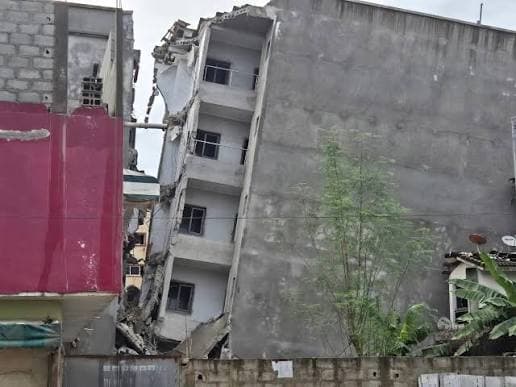
- Risk of demolition if the subdivision was cancelled for encroaching on a non-buildable zone.
- Blocking of notarial deeds: a notary will not draft a deed of sale on a lot from a non-approved subdivision.
- Disputes with neighbors or with the State.
Verification on the MCLU platform is the first line of defense. It takes five minutes and costs nothing: the portal is public.
Which official platforms to consult?
Shortcut: if you only want to know the status of a subdivision (approved, suspended, cancelled) without working through the MCLU portal step by step, our public subdivisions dashboard aggregates the same official data with a unified interface and a filter by status. The tutorial below remains useful for mastering the primary source and archiving proof of official consultation.
Three public platforms are worth knowing. This article covers the first; the second and the third are the subject of dedicated articles.
| Platform | URL | What it is for |
|---|---|---|
| MCLU Subdivision | construction.gouv.ci/mclulotissement/index.php | Check the status of a subdivision (approved/cancelled/suspended) |
| IDUFCI | idufci.construction.gouv.ci | Check the unique land identifier of a parcel |
| SIGFU | (currently being deployed) | Consolidate all urban land information |
One point deserves to be underlined: do not use private platforms that "facilitate" the verification on your behalf. The official portals are public and carry no charge, and any serious verification has to rest on those direct sources.
How to access the MCLU Subdivision portal
- Open a browser (Chrome, Safari, Firefox) on a computer or a mobile device.
- Enter the URL: construction.gouv.ci/mclulotissement/index.php.
- The home page displays a central search form with the seven official fields.
- No account to create. No identification required.
A few precautions before launching the search:
- Check that the URL begins with
construction.gouv.ci. Nothing stops a third-party site from imitating the official address to within one character, with an extra hyphen or a different extension. - On mobile, the form may overflow slightly: rotating to landscape helps.
- Plan for a stable connection, because the platform can be slow during business hours.
Step 1: choose your commune or sub-prefecture
The "Commune/Sub-prefecture" field
This dropdown is the first filter to fill in. It lists more than 400 communes and sub-prefectures of Ivory Coast, in alphabetical order, from ABENGOUROU to ZUENOULA.
For a lot in Abidjan, the most consulted communes are ABOBO, ADJAME, ANYAMA, ATTECOUBE, BINGERVILLE, COCODY, KOUMASSI, MARCORY, PLATEAU, PORT-BOUET, TREICHVILLE, and YOPOUGON.
Outside Abidjan: SONGON, DABOU, GRAND-BASSAM, ASSINIE, JACQUEVILLE, BOUAKE, SAN-PEDRO, and YAMOUSSOUKRO.
Practical point
If your land sits in a neighborhood (Riviera, Zone 4, Angré, Faya), you first have to identify which commune it belongs to. Capital Foncier maintains an internal database of 331 neighborhoods with their parent commune; your advisor can make that match if there is any doubt.
Step 2: fill in the other fields (optional but useful)
Once the commune is selected, six additional fields refine the search. All of them are optional, but the more you fill in, the more precise the result.
| Field | Type | What it is for |
|---|---|---|
| Subdivision | Free text field | Enter the name of the subdivision (e.g. "Riviera Golf", "Angré Extension") |
| Order Number | Text field | If you have the exact number (e.g. 2021-0421/MCLU/DDU) |
| Order Date | Date field | Precise date of the approval order |
| Year | Dropdown 1900-2050 | Year of approval if known |
| Subdivision Status | Dropdown | Approved / Cancelled / Suspended |
| Publication | Dropdown | Released / Not released |
Search strategy
- Broad search, to explore every subdivision in a commune: choose only the commune and leave the other fields empty.
- Targeted search, to check one specific subdivision: commune, name, and possibly year.
- Legal search, to confirm an order cited by a seller: order number and date.
Step 3: click on "Search"
Two buttons are available. "Search" launches the query; it is the main button. "Reset" empties every field and takes you back to square one.
After the click on Search, the platform returns a table of results listing the matching subdivisions with their main columns: name, developer (if known), order date, status, publication.
Expect 3 to 10 seconds of waiting depending on server load and on the volume of the commune.
Step 4: read and interpret the three official statuses
The "Status" field is the heart of the information. Three values are possible.
Approved
The subdivision has been the subject of a ministerial approval order. It is regularly constituted. The lots derived from it can receive individual ACDs. This is the nominal case, and the only comfortable one.
Suspended
The approval procedure is on hold. The reasons may be multiple: non-compliance with the Master Urban Plan (PUD), an administrative appeal in progress, shortcomings in the regularization. No transaction should be concluded on a lot in a suspended subdivision without further verification with the Direction du Domaine Urbain (DDU, the Urban Domain Directorate) of the MCLU.
Cancelled
The approval order has been withdrawn. The lots have no legal value. A building put up on a lot in a cancelled subdivision can be demolished. No notarial deed can be drafted. To be avoided absolutely.
A fourth case exists, an implicit one: "Not found". The subdivision you are looking for does not appear in the database. That does not mean it has been cancelled; it means that either (a) the name is misspelled, or (b) the subdivision has never been the subject of an MCLU approval order. In this second case, it is a major warning signal.
The "Publication" field
Two values: Released or Not released. This field indicates whether the order has been published in the Official Journal. A subdivision that is approved but not released is not yet enforceable against third parties. For an acquisition that is solid in legal terms, favor subdivisions that are both approved and released.
Step 5: archive proof of consultation
Whatever the outcome of your search, keep a record:
- A screenshot of the result, full page, dated and timestamped.
- A PDF print of the result page via the browser menu (Ctrl+P or Cmd+P, then Save as PDF).
- A photo of the result with the URL visible and a date marker.
That archive will be useful in the event of subsequent litigation: it attests that you consulted the public information on date X.
Step 6: cross-check with IDUFCI
Once the subdivision is verified, the next step consists of checking the unique land identifier (IDUFCI) of the parcel offered for sale. That step is done on idufci.construction.gouv.ci.
The IDUFCI is a unique alphanumeric number that identifies each urban parcel, a little like the chassis number of a vehicle. A lot in an approved subdivision must have an IDUFCI attached to it.
The five mistakes to avoid during verification
Mistake 1: relying solely on the seller's word
A seller can state "the subdivision is approved" without that being the case. Verification on the official platform is the only reliable source. Five minutes of research is always worth the trouble.
Mistake 2: confusing an approved subdivision with a secure lot
A subdivision can be approved while one specific lot is the subject of litigation: double sale, land claim, mortgage. Checking the subdivision does not replace checking the land status of the individual title, which is requested from the Conservation de la Propriété Foncière et des Hypothèques (CPFH, the land and mortgage registry) for 3,000 FCFA.
Mistake 3: ignoring the "suspended" status
Some sellers play it down: "it's suspended, but it will get sorted out". A suspension can last for years, and sometimes turns into a cancellation. No transaction should be concluded on the basis of "it will get sorted out".
Mistake 4: consulting an imitation platform
An imitation address is easy to register and easy to mistake for the real one. Always check that the URL begins with construction.gouv.ci. Private platforms that offer "quick verifications" for a fee do not replace the official source.
Mistake 5: not archiving the result
Without proof of consultation, in the event of future litigation, you will have to redo the search, and the information may have moved in the meantime. Save a dated PDF version every time.
What to do if the subdivision is "suspended" or "cancelled"
If "suspended"
- Stop all negotiation immediately.
- Contact the Direction du Domaine Urbain (DDU) of the MCLU to understand the reason for the suspension.
- Ask your notary, or a land advisor, for an in-depth review of the file.
- Wait for the suspension to be lifted before any signature, or walk away.
If "cancelled"
- No transaction is possible.
- If you have already signed a sale agreement, consult a specialized lawyer without delay to exercise a remedy (nullity, refund).
- If you have already built on a lot in a cancelled subdivision, the situation is complex and calls for personalized legal support.
If "not found"
- Check the spelling of the subdivision name.
- Check the commune, because the subdivision may be attached to the neighboring one.
- If the result stays empty after several variations, the subdivision does not officially exist, which is a deal-breaker.
For the diaspora: how to run the verification remotely
The good news: the MCLU platform is reachable from anywhere in the world. Three options for the diaspora.
- Personal verification: connect directly, run the search, archive the result. Five minutes, and 100% free.
- Delegating to a trusted advisor: Capital Foncier or another specialized firm runs the verification and provides a dated PDF report. In our case, that work is part of the discovery consultation.
- Asking the seller for the dated screenshot: a serious seller will have no difficulty giving you a recent screenshot of the positive result. A refusal to share is a negative signal.
For the resident buyer: the first-conversation reflex
From the very first discussion with a seller, before you even visit the land, ask these three questions:
- What is the exact name of the subdivision?
- In which commune is it registered?
- Can you give me the screenshot of the MCLU platform showing the "Approved" and "Released" status?
A serious seller answers within 24 hours. A seller who stalls, changes the subject, or offers an "all-inclusive package, no need to worry about the paperwork" is a warning signal, whatever the apparent quality of the land.
What Capital Foncier takes away from MCLU verification
- The official platform is the reference tool for preventing land scams in Ivory Coast. It is public and carries no charge.
- The three statuses (Approved, Cancelled, Suspended) are the minimum grammar that every buyer has to master.
- The "Approved + Released" pair is the only combination enforceable against third parties. Any other combination calls for additional verification.
- Archiving the result, as a dated PDF screenshot, protects the buyer in the event of future litigation. It is a professional reflex.
To go further
- The 6 types of urban planning opinions in Ivory Coast
- Regular subdivision vs regularization: 2,440 requests decoded
- Domain status, land status, tax situation certificate
- ACD and Land Title: the legal truth
Securing your land project
A Capital Foncier advisor checks the status of the subdivision you are interested in on the official MCLU platform, archives the dated PDF screenshot, and calls you back within two hours with the verdict.
Get my diagnostic. Two minutes to describe your project.
Sources
- Official MCLU Subdivision platform
- Official IDUFCI platform
- MCLU Statistical Yearbook 2018-2023, Table 11 (DUDU)
- BÂTIR Magazine No. 004 (2022): MCLU timeframes and procedures
- Order No. 2013-481 of July 2, 2013: urban land domain
- Law No. 2020-624 of August 14, 2020: Urban Planning Code
About this article
Written by Alain Kadio, founder of Capital Foncier SARL (Abidjan), from direct verification of the official construction.gouv.ci/mclulotissement platform in April 2026 and from consolidated MCLU doctrine (BÂTIR 2022-2024).
Initial publication: May 3, 2026. Last verification of the official platform: April 24, 2026.
This article has an educational purpose. It constitutes neither legal advice nor individualized investment advice. The official platform evolves; check the current version at the time of any decision.
The Capital Foncier team, Abidjan, Ivory Coast
"Our mission is to secure every square metre purchased by our investors."
?Frequently asked questions
How to verify that a subdivision is approved by the MCLU?+
Go to construction.gouv.ci/mclulotissement/index.php, select the commune in the dropdown, enter the name of the subdivision in the text field, then click on "Search". The results table indicates the official status (Approved / Cancelled / Suspended) and the publication state (Released / Not released).
Where to find the IDUFCI number of an urban parcel in Ivory Coast?+
The IDUFCI is an alphanumeric identifier assigned to each urban parcel. It normally appears on the documents provided by the seller, deed of sale or land status. Its verification is done on the idufci.construction.gouv.ci platform. A seller who cannot produce the IDUFCI signals a potentially precarious title.
What does a "suspended" subdivision mean on the MCLU portal?+
The "suspended" status means that the approval procedure for the subdivision is on hold at the administration. The reasons may be multiple: non-compliance with the Master Urban Plan, an administrative appeal in progress, irregularities in the regularization. No transaction should be concluded on a lot in a suspended subdivision without further verification with the Direction du Domaine Urbain (DDU, the Urban Domain Directorate).
Is MCLU verification open to the public without charge?+
Yes, without charge and without identification. No account to create. No payment. Private platforms that offer "express verifications" for a fee do not replace the official source.
Can I buy a lot in a subdivision "pending" approval?+
A lot in a pending subdivision, meaning one not yet approved, carries a significant legal risk: approval can be refused, postponed, or made conditional. In practice, serious players wait for definitive approval and its release in the Official Journal before any transaction. If negotiation moves ahead before approval, provide for an explicit suspensive clause in the sale agreement.
How long does it take for a subdivision to go from "pending" to "approved"?+
The texts set no precise deadline, and observed timeframes range from a few months to several years depending on the complexity of the file, initial compliance, and any appeals. According to the MCLU 2018-2023 yearbook, 78.5% of regular subdivision requests receive a favorable opinion, and 81.5% of regularization requests. That means roughly 20% of files are refused or postponed.
Whom to contact if my subdivision does not appear on the portal?+
Two options: (a) contact the Direction du Domaine Urbain (DDU) of the MCLU directly for clarification, (b) consult a notary or a land advisor to check whether the subdivision exists under another name or in a different commune. If none of those leads goes anywhere, the subdivision has in all likelihood never been the subject of an official procedure, a deal-breaking signal for any transaction.